Remote data
ClickHouse can read a file in a bucket, a page on the web, a Postgres table or another ClickHouse server as if it were a table, through its table functions. It is the engine's best trick and usually the reason people reach for it. In a SQL client it is normally a function signature you type from memory, with no completion, no schema, and no way to find out what went wrong except to run it and read an error about argument four.
SnoutData gives it a form. Open a ClickHouse connection in the sidebar and click Remote data, under Operations.
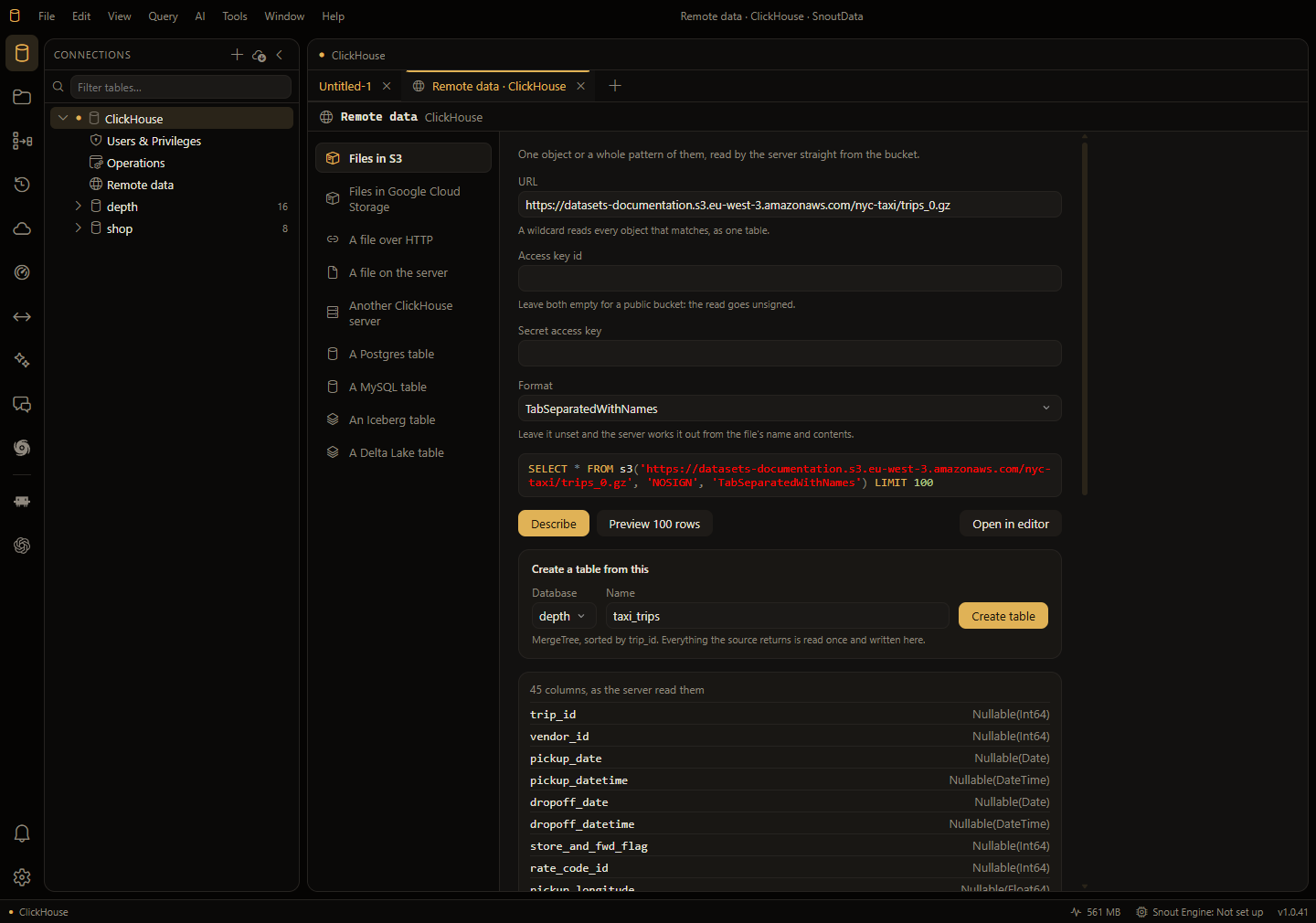
What you can point it at
| Source | Function | What it needs |
|---|---|---|
| Files in S3 | s3 | A URL, and a key pair for a private bucket |
| Files in Google Cloud Storage | gcs | A URL, and an HMAC key for a private bucket |
| A file over HTTP | url | A URL the server can fetch |
| A file on the server | file | A path inside the server's own user_files directory |
| Another ClickHouse server | remote | An address, a database and a table |
| A Postgres table | postgresql | Host and port, database, table, user |
| A MySQL table | mysql | Host and port, database, table, user |
| An Iceberg table | iceberg | A URL to the table's location |
| A Delta Lake table | deltaLake | A URL to the table's location |
A URL may be a pattern: .../events/2026/*.parquet reads every object that matches, as one table.
The three things it does
Describe runs DESCRIBE TABLE and shows the columns and types the server inferred, without
reading a row of data. It is the question you actually have about somebody else's file, and it
costs nothing to ask.
Preview 100 rows runs the statement with a LIMIT so you can see that it really is the data
you meant.
Create a table writes it into this database: CREATE TABLE ... ENGINE = MergeTree ORDER BY <first column> AS SELECT * FROM <the source>. You choose the database and the name, read the
statement on a review sheet, and the editor opens on the new table afterwards. For anything more
particular than that, use Open in editor and write the statement yourself; this action is the
one-click path for "get it in here".
Credentials
The ClickHouse SERVER is what fetches the data, not the app on your machine. Two things follow, and they are why this screen exists rather than a snippet in the editor.
A bucket that is open to the world needs no credential, and leaving the key pair empty is how you say so: the statement asks for the read to go unsigned. That is not the same as saying nothing, which a server reads as "use your own credentials" and refuses.
A credential that lives on your computer cannot be used. An AWS CLI profile, an instance role or a
gcloud configuration means nothing to the machine doing the reading, so SnoutData refuses those
by name instead of letting a bucket answer with a permission error you would have to guess at. A
key PAIR can be handed over, and that is what the form takes.
A credential you do give it never appears in a statement you can see or that is kept. If you pick
a saved cloud account, its key is read from your keychain at the moment the statement runs and
never reaches the screen. If you type a password (remote, Postgres and MySQL all take one as an
argument), the statement that runs carries it and every copy of that statement which is shown,
opened in the editor, or written to your query history carries '<redacted>' instead. The
redacted form is deliberately not runnable.
Values typed into this form are kept only while the tab is open. Nothing here is saved to disk, so a password has to be typed again next time.
Limits
Completion does not reach inside a table function's arguments yet, a source cannot be saved and
reused, and the functions that require a structure argument (mongodb, azureBlobStorage) are not
offered, because a form cannot ask for a column list you do not have yet.